Convonet Voice AI Productivity System
Multi-LLM (Claude, Gemini, OpenAI) + LiveKit WebRTC + Domain Agents (Productivity, Mortgage, Healthcare) + MCP Tools + Team Collaboration + Call Transfer + Agent Monitor + Sentry
Technical Architecture
System Architecture Overview
Complete System Flow Diagrams
System Architecture Diagram
Complete system flow overview with all components and their relationships
View Full Diagram →Sequence Diagram
Step-by-step flow (52 steps) showing interactions between all components
View Full Diagram →Evolution to FastAPI
To ensure enterprise-grade scalability and native asynchronous support for real-time voice, the system has evolved from a pure Flask monolith to a FastAPI Hybrid Gateway.
- • ASGI Master Gateway: FastAPI serves as the primary entry point (asgi_main.py), handling high-concurrency connections and native WebSockets.
- • Flask Sub-system: The legacy Flask application remains
fully functional, mounted as a sub-app via
WSGIMiddleware. - • Legacy Compatibility: Socket.IO connections are stabilized using a forced polling transport fallback, ensuring reliable session state through the WSGI bridge.
- • Uvicorn Deployment: The system now runs on the Uvicorn ASGI server, providing superior performance over traditional WSGI workers.
Request Routing Flow
Architecture Flow: Enterprise voice AI system with multi-LLM (Claude, Gemini, OpenAI), LiveKit WebRTC, domain-specific agents (Productivity, Mortgage, Healthcare), PIN authentication (PostgreSQL), team collaboration, Agent Monitor for real-time tool/voice timing, intelligent call transfer to FusionPBX via Twilio, streaming STT/TTS (Deepgram, ElevenLabs, Cartesia), and Sentry error monitoring with automatic thread reset recovery.
Overview
The Convonet Voice AI Productivity System is an enterprise-grade platform that combines
multi-LLM AI (Claude, Gemini, OpenAI), LiveKit WebRTC voice, domain-specific agents (Productivity, Mortgage,
Healthcare),
team collaboration, and intelligent call center integration. Built for hackathon demonstrations,
it showcases advanced features including PIN authentication, role-based access control,
Agent Monitor for real-time tool/voice timing, call transfer to FusionPBX, and Sentry monitoring.
The system enables teams to manage todos, assign tasks, and collaborate in real-time
through web dashboards, voice commands, and seamless transfer to human agents. Voice runs on
LiveKit WebRTC with streaming STT (Deepgram) and TTS (Deepgram, ElevenLabs, Cartesia).
All data syncs with Google Calendar via OAuth2, with intelligent caching for sub-second voice responses.
Core Technologies
- • LangGraph for agent orchestration with tools_condition
- • Multi-LLM: Claude, Gemini, OpenAI
- • Model Context Protocol (MCP) - 38 tools (36 DB + 2 transfer)
- • LangChain for LLM integration & tool binding
- • FastAPI + ASGI Master Gateway
- • Flask + WSGIMiddleware (Legacy Sub-system)
- • LiveKit WebRTC for real-time voice
- • Deepgram STT; TTS: Deepgram, ElevenLabs, Cartesia
- • SQLAlchemy ORM with PostgreSQL (multi-tenant)
- • PIN authentication (4-6 digit voice PIN)
- • Agent Monitor: real-time tool/voice timing
- • Twilio Programmable Voice with Media Streams
- • Google Calendar OAuth2 integration (optimized)
- • FusionPBX SIP integration for call transfer
- • Sentry.io error monitoring & performance tracking
- • JsSIP WebRTC for browser-based softphone
- • Render.com deployment with Uvicorn (ASGI)
Key Features
- • Domain-specific agents: Productivity, Mortgage, Healthcare
- • LiveKit WebRTC voice with streaming STT/TTS
- • Agent Monitor: real-time tool calls & voice timing
- • Multi-tenant team collaboration with role hierarchy
- • PIN-based voice authentication (4-6 digits)
- • Intelligent call transfer: AI → FusionPBX Extension 2001
- • Multi-TTS: Deepgram, ElevenLabs, Cartesia
- • Sentry error monitoring & performance tracking
- • Optimized timeouts (8s/10s/12s) for Twilio compatibility
- • 38 MCP tools (todos, calendar, teams, transfer)
- • WebRTC call center with JsSIP softphone
- • Google Calendar OAuth2 sync (background)
- • FusionPBX integration on Google Cloud VM
- • Production deployment on Render with auto-scaling
Recent Updates & Improvements (February 2026)
FastAPI Hybrid Gateway
- ✓ ASGI Master Gateway (asgi_main.py)
- ✓ Flask mounted via WSGIMiddleware
- ✓ Native FastAPI Voice Gateway
- ✓ Uvicorn production deployment
- ✓ Optimized Socket.IO polling fallback
Call Transfer to FusionPBX
- ✓ Seamless AI → Human agent transfer
- ✓ FusionPBX extension 2001 integration
- ✓ SIP/WSS connectivity (Google Cloud VM)
- ✓ Transfer detection via phrases or tool
- ✓ Department routing (support, sales, etc.)
LiveKit WebRTC + Agent Monitor
- ✓ LiveKit real-time voice (WebRTC)
- ✓ Streaming STT (Deepgram) & TTS (Deepgram/ElevenLabs/Cartesia)
- ✓ Domain agents: Productivity, Mortgage, Healthcare
- ✓ Agent Monitor: tool calls & voice timing
- ✓ Processing music during agent response
Composio Integration
- ✓ Slack workspace integration
- ✓ GitHub repository management
- ✓ Gmail email automation
- ✓ Notion workspace sync
- ✓ External platform connectivity
Sentry Integration
- ✓ Real-time error tracking & alerts
- ✓ Performance monitoring (agent processing time)
- ✓ User context & session tracking
- ✓ Timeout & thread reset tracking
- ✓ Production-grade observability
Timeout Optimization
- ✓ Tool timeout: 8s (from 20s)
- ✓ Agent timeout: 10s (from 25s)
- ✓ Webhook timeout: 12s (from 30s)
- ✓ Stays under Twilio's 15s HTTP limit
- ✓ Thread reset on timeout prevents errors
WebRTC Call Center
- ✓ JsSIP v3.10.1 browser softphone
- ✓ WebSocket Secure (WSS) on port 7443
- ✓ Agent dashboard with SIP registration
- ✓ Call control (answer, hold, transfer, hangup)
- ✓ Google Cloud firewall configured
Automatic Error Recovery
- ✓ Thread reset with timestamped IDs
- ✓ BrokenResourceError handling
- ✓ tool_call_id incomplete error recovery
- ✓ In-memory reset tracking (_reset_threads)
- ✓ No cascading failures
Performance Optimization
- ✓ Removed Google Calendar sync delay
- ✓ Simplified JSON responses (no MCP breaks)
- ✓ Agent processing time measurement
- ✓ Transaction tracking per voice call
- ✓ Custom Sentry metrics & measurements
LiveKit WebRTC Voice Integration Architecture
The LiveKit WebRTC Voice Interface provides browser-based voice interaction with real-time audio streaming via LiveKit, domain-specific agents (Productivity, Mortgage, Healthcare), streaming STT (Deepgram) and TTS (Deepgram, ElevenLabs, Cartesia), and seamless integration with the LangGraph AI agent. Users interact with the assistant directly through their web browser.
LiveKit Voice Assistant Architecture
LiveKit WebRTC Processing Flow
Flow: User Browser → LiveKit WebRTC → PIN Auth (PostgreSQL) → Streaming STT (Deepgram) → LangGraph → Multi-LLM (Claude/Gemini/OpenAI) → Domain Agents → Tool Calling → Streaming TTS (Deepgram/ElevenLabs/Cartesia) → User Browser
WebRTC Voice Assistant Flow Phases
View Detailed Sequence Diagram →Phase 1: Authentication
Steps 1-7
WebSocket connection, PIN authentication via PostgreSQL, Redis session creation
Phase 2: Conversation Loop
Steps 8-31
LiveKit audio → Streaming STT (Deepgram) → LangGraph → Multi-LLM → Domain agents → Tool execution → Streaming TTS (Deepgram/ElevenLabs/Cartesia) → Response
Phase 3: Transfer Request
Steps 32-38
User requests transfer, LangGraph detects intent, sets transfer flag in Redis
Phase 4: Twilio Transfer
Steps 39-52
Twilio API → FusionPBX → Agent Dashboard (JsSIP) → Live conversation bridging
LiveKit WebRTC Architecture: Browser-based voice assistant with LiveKit WebRTC, PostgreSQL PIN authentication, streaming STT (Deepgram) and TTS (Deepgram, ElevenLabs, Cartesia), LangGraph AI orchestration with multi-LLM (Claude, Gemini, OpenAI), domain-specific agents (Productivity, Mortgage, Healthcare), Agent Monitor for real-time tool/voice timing, MCP tool integration, and seamless transfer to FusionPBX via Twilio.
Component Interaction Matrix
| Component | Input From | Output To | Purpose |
|---|---|---|---|
| User Browser | User voice input | WebSocket Server | Captures audio, displays UI |
| WebSocket Server | Browser, WebRTC Server | Browser, Redis | Manages real-time communication |
| PIN Auth | WebSocket Server | PostgreSQL | Validates user credentials |
| Redis | WebRTC Server, Tools | Deepgram, WebRTC Server | Buffers audio, stores session |
| Deepgram STT | Redis Audio Buffer | WebRTC Voice Server | Converts speech to text |
| LangGraph | WebRTC Server | Claude LLM, Tools | Orchestrates AI conversation flow |
| Claude LLM | LangGraph | LangGraph | Generates responses, decides actions |
| Tool Calling | LangGraph | PostgreSQL, Google APIs | Executes external operations |
| Deepgram TTS | LangGraph Response | WebRTC Server | Converts text to speech |
| Twilio API | WebRTC Server | FusionPBX | Bridges call to agent |
| FusionPBX | Twilio | Agent Dashboard | Routes call to extension |
| Agent Dashboard | FusionPBX | PostgreSQL, User | Displays call, shows user info |
WebRTC Voice Interface
- ✓ Browser-based voice recording
- ✓ Real-time audio streaming
- ✓ WebSocket communication
- ✓ Audio format detection (WebM)
- ✓ Base64 audio encoding
Redis Session Management
- ✓ Session storage & caching
- ✓ Audio buffer management
- ✓ Real-time notifications
- ✓ User activity tracking
- ✓ Session expiration handling
Composio Integration
- ✓ Slack workspace integration
- ✓ GitHub repository management
- ✓ Gmail email automation
- ✓ Notion workspace sync
- ✓ Jira project management
Module Structure
Convonet Project Structure
Project Root/
├── asgi_main.py                    # FastAPI ASGI Master Gateway (Entry Point)
├── app.py                          # Main Flask application (Mounted as sub-app)
├── app_memory_optimized.py         # Memory-optimized Flask application
├── passenger_wsgi.py               # WSGI entry point for legacy support
├── passenger_wsgi_memory_optimized.py  # WSGI entry for memory-optimized app
├── extensions.py                   # Flask extensions (db, login, migrate, etc.)
├── requirements.txt                # Python dependencies
├── requirements-render.txt         # Production dependencies (No Eventlet)
├── Procfile                        # Render.com process file (runs Uvicorn)
├── render-hybrid.yaml              # Render.com hybrid deployment config
├── render-build.sh                 # Build script for Render.com
├── templates/                      # Flask templates
│   ├── team_dashboard.html         # Team management UI
│   ├── register.html               # User registration
│   ├── convonet_tech_spec.html     # Technical documentation
│   ├── convonet_system_architecture.html  # System architecture diagram
│   ├── convonet_sequence_diagram.html     # Sequence diagram page
│   └── agent_monitor_dashboard.html       # Agent Monitor (tool/voice timing)
├── static/                         # Static assets
│   └── convonet/                   # Convonet static files
│       └── assets/                 # Images, CSS, JS
├── shared/                         # Shared utilities
│   ├── google_calendar.py          # Google Calendar integration
│   ├── helpers.py                  # Shared helper functions
│   └── schemas.py                  # Shared data schemas
└── convonet/                       # Convonet module
    ├── __init__.py                 # Package initialization
    ├── routes.py                   # Flask routes & Twilio webhooks (Sentry integrated)
    ├── assistant_graph_todo.py     # LangGraph agent (optimized timeouts)
    ├── state.py                    # Agent state management
    ├── asgi_main.py                # FastAPI ASGI application
    ├── fastapi_voice_gateway.py    # FastAPI-native Voice Assistant Gateway
    ├── webrtc_voice_server_socketio.py  # LiveKit WebRTC voice server
    ├── agent_monitor.py            # Agent Monitor (tool/voice timing)
    ├── deepgram/                   # Deepgram STT/TTS (streaming)
    ├── audio_player_routes.py      # Audio stream player routes
    ├── redis_manager.py            # Redis session & audio buffer management
    ├── composio_tools.py           # Composio tool integration
    ├── twilio_handler.py           # Twilio call handling
    ├── voice_intent_utils.py       # Voice intent detection utilities
    ├── voice_utils.py              # Voice processing utilities
    ├── environment_config.py       # Environment configuration
    ├── models/                     # Database models
    │   ├── base.py                 # Shared SQLAlchemy Base
    │   └── user_models.py          # User, Team, TeamMembership models
    ├── security/                   # Authentication & authorization
    │   └── auth.py                 # JWT authentication system
    ├── api_routes/                 # RESTful API endpoints
    │   ├── auth_routes.py          # User registration & login
    │   ├── jwt_scr.py              # JWT secret key management
    │   ├── team_routes.py          # Team management API
    │   └── team_todo_routes.py     # Team todo management API
    ├── migrations/                 # Database migrations
    │   ├── add_team_collaboration.py  # Team collaboration migration
    │   └── add_voice_pin.py        # Voice PIN authentication migration
    ├── mcps/                       # Model Context Protocol servers
    │   ├── mcp_config.json         # MCP server configuration
    │   └── local_servers/
    │       ├── db_todo.py          # 36 database tools (optimized)
    │       ├── call_transfer.py    # 2 call transfer tools (FusionPBX)
    │       └── google_calendar.py  # Calendar operations
    ├── static/                     # Convonet static assets
    │   └── assets/
    │       ├── img/                # Images & diagrams
    │       ├── css/                # Stylesheets
    │       └── js/                 # JavaScript files
    └── templates/                  # Convonet templates
        ├── convonet_todo_index.html  # Main todo interface
        └── webrtc_voice_assistant.html  # LiveKit voice assistant UI
Database Schema
users_convonet
- • id: UUID (PK)
- • email: String (unique)
- • username: String (unique)
- • password_hash: String
- • first_name: String
- • last_name: String
- • is_active: Boolean
- • is_verified: Boolean
- • created_at: DateTime
- • last_login_at: DateTime
teams_convonet
- • id: UUID (PK)
- • name: String
- • description: Text
- • is_active: Boolean
- • created_at: DateTime
- • updated_at: DateTime
team_memberships_convonet
- • id: UUID (PK)
- • team_id: UUID (FK)
- • user_id: UUID (FK)
- • role: Enum (owner/admin/member/viewer)
- • joined_at: DateTime
- • updated_at: DateTime
todos_convonet
- • id: UUID (PK)
- • title: String
- • description: String
- • completed: Boolean
- • priority: Enum
- • due_date: DateTime
- • creator_id: UUID (FK)
- • assignee_id: UUID (FK)
- • team_id: UUID (FK)
- • is_private: Boolean
- • google_calendar_event_id
reminders_convonet
- • id: UUID (PK)
- • reminder_text: String
- • importance: Enum
- • reminder_date: DateTime
- • google_calendar_event_id
- • created_at: DateTime
- • updated_at: DateTime
calendar_events_convonet
- • id: UUID (PK)
- • title: String
- • description: String
- • event_from: DateTime
- • event_to: DateTime
- • google_calendar_event_id
- • created_at: DateTime
- • updated_at: DateTime
call_recordings_convonet
- • id: UUID (PK)
- • call_sid: String (unique)
- • from_number: String
- • to_number: String
- • recording_path: String
- • transcription: Text
- • status: String
- • created_at: DateTime
LangGraph Agent Architecture
LangGraph Workflow Diagram
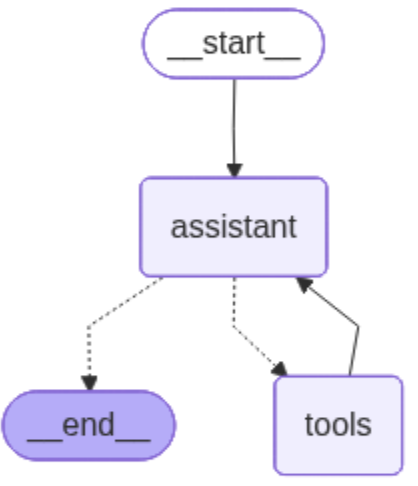
LangGraph Workflow: The agent can either continue to use tools or end the conversation based on user input and context.
Agent Components
- • TodoAgent Class: Main agent orchestrator with lazy initialization
- • StateGraph: Manages conversation flow and state
- • Assistant Node: GPT-4 reasoning and response generation
- • Tool Node: Executes 38 MCP tools
- • Conditional Edges: Routes between nodes based on tool calls
- • InMemorySaver: Checkpointer for state persistence
State Management
- • AgentState: Conversation state with message history
- • Message History: Maintains context across turns
- • Customer ID: User identification for multi-tenant
- • Thread ID: Conversation thread tracking
- • Lazy Loading: Prevents circular imports
- • ExceptionGroup Handling: Robust error recovery
Model Context Protocol (MCP) Integration
MCP provides a standardized way for AI agents to interact with external tools and services. The Convonet system uses MCP to expose 38 tools for database operations, team management, call transfer to FusionPBX, Google Calendar integration, and WebRTC voice processing with Deepgram STT.
MCP Server Configuration
{
  "mcpServers": {
    "db": {
      "command": "python",
      "args": ["./convonet/mcps/local_servers/db_todo.py"],
      "transport": "stdio",
      "env": {
        "DB_URI": "${DB_URI}",
        "GOOGLE_OAUTH2_TOKEN_B64": "${GOOGLE_OAUTH2_TOKEN_B64}",
        "GOOGLE_CLIENT_ID": "${GOOGLE_CLIENT_ID}",
        "GOOGLE_CLIENT_SECRET": "${GOOGLE_CLIENT_SECRET}"
      }
    }
  }
}
Available MCP Tools (38)
Todo Management (5)
- • create_todo
- • get_todos
- • complete_todo
- • update_todo
- • delete_todo
Team Tools (8)
- • create_team
- • get_teams
- • get_team_members
- • create_team_todo
- • add_team_member
- • remove_team_member
- • change_member_role
- • search_users
Reminders (4)
- • create_reminder
- • get_reminders
- • update_reminder
- • delete_reminder
Calendar (6)
- • create_calendar_event
- • get_calendar_events
- • update_calendar_event
- • delete_calendar_event
- • sync_google_calendar_events
- • test_google_calendar
Call Transfer (2)
- • transfer_to_agent
- • get_available_departments
Enhanced LangGraph Tool Calls
The LangGraph implementation provides intelligent tool calling capabilities with dynamic tool selection and error handling. The agent automatically chooses appropriate tools based on user intent and maintains conversation context for seamless interactions.
Tool Calls Flow Diagram
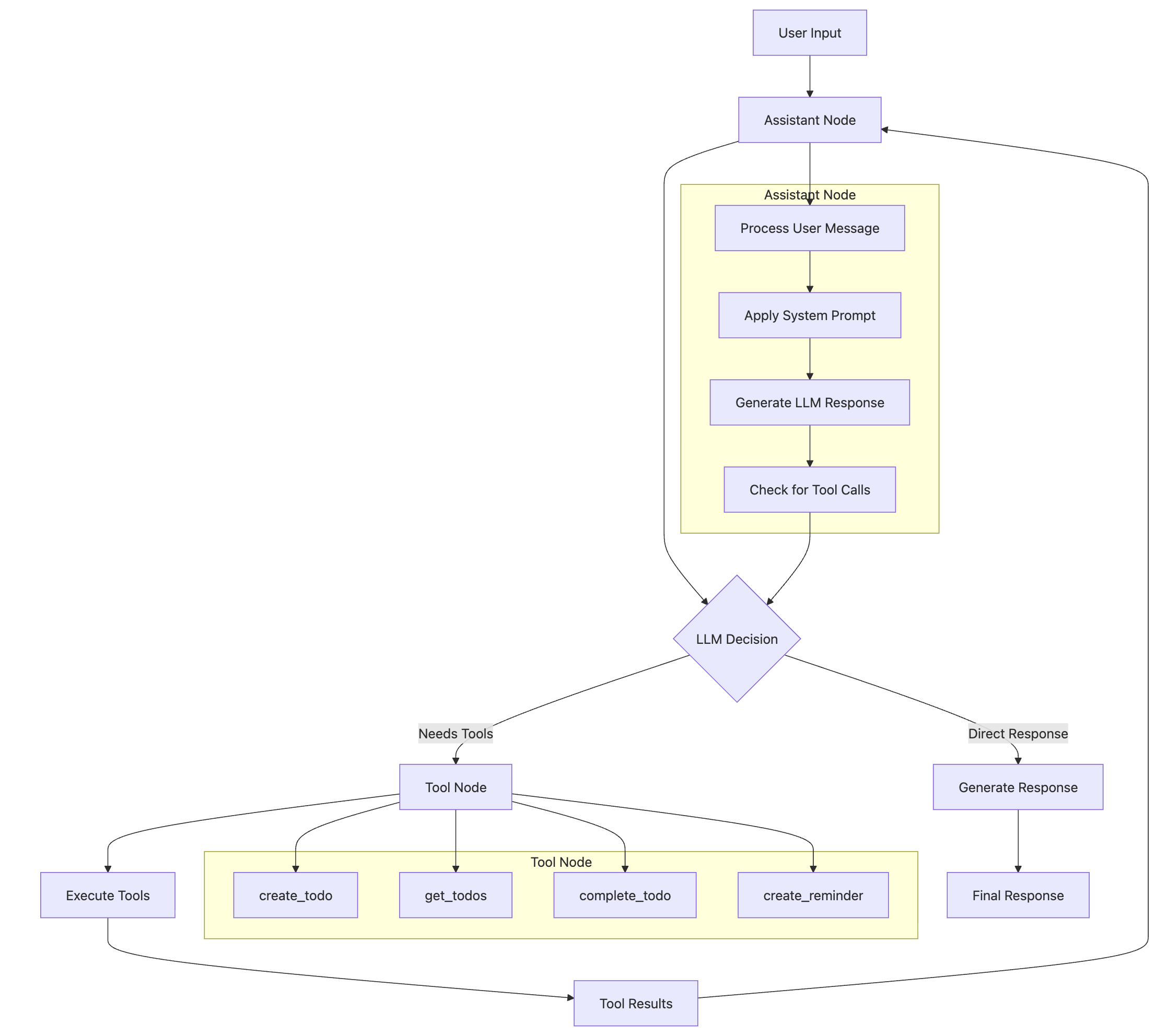
Tool Calls Flow: LangGraph implementation showing dynamic tool selection and intelligent orchestration of MCP tools.
Tool Calls Features
MCP Integration
- • Database operations via MCP servers
- • Google Calendar synchronization
- • Team collaboration tools
- • Real-time tool discovery (38 tools)
- • Secure tool communication via stdio
- • Lazy loading for performance
Error Handling
- • Graceful tool failure recovery
- • ExceptionGroup unwrapping
- • 20s timeout per tool
- • 30s overall agent timeout
- • Fallback strategies
- • User-friendly error messages
Tool Features: Intelligent tool calling system with error recovery, timeout management, and seamless MCP integration.
Core Tool Calling Capabilities
- • Dynamic Tool Selection: LLM intelligently chooses appropriate tools based on user intent
- • Error Recovery: Graceful handling of tool failures with fallback strategies
- • Context Awareness: Tools access conversation history and maintain state
- • Streaming Responses: Real-time tool execution updates for better user experience
- • Async Execution: Non-blocking tool calls with proper timeout management
- • ExceptionGroup Handling: Unwraps and logs complex async exceptions
JWT Authentication System
Authentication Flow
Security Features
- • Password Hashing: Bcrypt with automatic salt
- • JWT Tokens: HS256 algorithm with secret key
- • Token Expiry: 30 min access, 7 day refresh
- • Authorization: @require_auth decorator
- • Role Validation: @require_role decorator
- • Team Membership: @require_team_member decorator
- • Auto Logout: Frontend handles expired tokens
JWT Token Structure
{
  "user_id": "uuid",
  "email": "user@example.com",
  "roles": ["user"],
  "team_id": "uuid",
  "type": "access",
  "exp": 1728589200,  // 30 minutes from issue
  "iat": 1728587400   // issued at timestamp
}
New Features Technical Details
Redis Session Management & Caching
Session Management
- • Session creation, retrieval, updates, deletion
- • Audio buffer storage (base64 encoded)
- • User authentication state management
- • Session expiration handling
Real-time Features
- • Pub/Sub notifications for team updates
- • Rate limiting (requests per minute)
- • User activity tracking & analytics
- • Cache invalidation strategies
                                # Redis connection with environment config

                                REDIS_URL = os.getenv('REDIS_URL', 'redis://localhost:6379')

                                # Session data structure

                                session_data = {

                                  'user_id': 'user-123', 'audio_buffer': 'base64...',

                                  'created_at': timestamp, 'expires_at': ttl

                                }
Composio External Tool Integration
Supported Platforms
- • Slack: Message sending, channel management
- • GitHub: Repository operations, issue tracking
- • Gmail: Email composition, sending, management
- • Notion: Page creation, database operations
- • Jira: Ticket creation, project management
Integration Features
- • OAuth2 authentication for each platform
- • Robust method discovery for API compatibility
- • Error handling for missing methods
- • Tool orchestration with LangGraph
                                # Composio tool loading with fallback methods

                                if hasattr(toolset, 'get_tools'):

                                    tools = toolset.get_tools(apps=["slack"])

                                elif hasattr(toolset, 'get_actions'):

                                    tools = toolset.get_actions(apps=["slack"])
Audio Stream Player & WebM Support
Audio Processing
- • WebM format detection & handling
- • Base64 audio buffer decoding
- • Real-time audio streaming from Redis
- • Audio format conversion (WebM → WAV fallback)
Player Features
- • Session-based audio playback
- • Audio file download (WebM/WAV)
- • Audio buffer analysis & debugging
- • Flask-SocketIO real-time updates
                                # WebM format detection

                                if audio_data.startswith(b'\x1a\x45\xdf\xa3'):

                                    return Response(audio_data, mimetype='audio/webm')

                                # Audio buffer from Redis

                                audio_buffer = session_data.get('audio_buffer', '')

                                audio_data = base64.b64decode(audio_buffer)
API Endpoints
Authentication
POST /api/auth/registerPOST /api/auth/loginPOST /api/auth/refreshGET /api/auth/profilePUT /api/auth/profile
Team Management
POST /api/teams/GET /api/teams/GET /api/teams/{id}POST /api/teams/{id}/membersDELETE /api/teams/{id}/members/{user_id}PUT /api/teams/{id}/members/{user_id}/role
Twilio Voice
POST /convonet_todo/twilio/callPOST /convonet_todo/twilio/process_audioPOST /convonet_todo/twilio/transfer
Webhook URL:
https://hjlees.com/convonet_todo/twilio/callLiveKit WebRTC Voice
GET /webrtc/voice-assistantGET /fastapi/voice-assistant(FastAPI Native)WebSocket /voiceWebSocket /fastapi/voice-assistant/wsGET /audio-player/
Features: LiveKit WebRTC, streaming STT (Deepgram), TTS (Deepgram/ElevenLabs/Cartesia), domain agents, Agent Monitor
Agent Monitor
GET /agent-monitor/
Real-time tool calls, voice timing, elapsed time per tool
Redis Audio Player
GET /audio-player/GET /audio-player/sessionsGET /audio-player/audio/{session_id}WebSocket /audio-stream
Audio Player Dashboard:
Features: View and analyze audio streams from Redis audio buffers, real-time session monitoring, audio playback and download
Team Dashboard
GET /team-dashboardPOST /api/teams/GET /api/teams/{id}/todosGET /api/teams/{id}/calendar
Team Dashboard:
Features: Team collaboration dashboard with todo management, calendar integration, member management, real-time updates, and role-based access control
Demo Credentials: admin@convonet.com / admin123
Call Center Agent Dashboard
A complete browser-based SIP phone client with ACD (Automatic Call Distribution) capabilities, providing enterprise-grade call center management features for handling voice assistant transfers and customer support calls.
Agent Management
- ✓ Secure agent authentication
- ✓ SIP credential management
- ✓ Session management
- ✓ Agent state tracking (Ready/Not Ready/On Call/Wrap Up)
- ✓ Time-in-state tracking
- ✓ Activity logging
Call Handling
- ✓ Incoming call notifications
- ✓ Caller ID display
- ✓ Answer/Reject controls
- ✓ Call hold/unhold
- ✓ Call transfer (blind & attended)
- ✓ Outbound dialing
- ✓ Call duration tracking
Customer Data Popup
- ✓ Automatic customer info display
- ✓ Customer ID & contact info
- ✓ Account status & tier
- ✓ Last contact date
- ✓ Open tickets/cases
- ✓ Lifetime value
- ✓ Agent notes
SIP Integration
- ✓ Browser-based SIP client (JsSIP)
- ✓ WebRTC audio support
- ✓ WebSocket Secure (WSS)
- ✓ RFC 3261 compliant
- ✓ Multiple codec support (G.711, Opus, G.722)
- ✓ NAT traversal (STUN/TURN)
Dashboard Interface
- ✓ Agent status panel
- ✓ Call control panel
- ✓ 12-key dialpad
- ✓ Call history display
- ✓ Real-time status updates
- ✓ Responsive design (desktop/tablet/mobile)
Monitoring & Reporting
- ✓ Agent metrics (calls handled, duration)
- ✓ Call metrics (answer rate, wait time)
- ✓ Real-time monitoring
- ✓ Activity timeline
- ✓ Availability percentage
Agent States
Voice Assistant Transfer Integration
When a user requests to speak with a human agent during a WebRTC voice assistant session, the system automatically transfers the call to the Call Center Agent Dashboard:
API Endpoints
Agent Management
POST /call-center/api/agent/loginPOST /call-center/api/agent/logoutPOST /call-center/api/agent/readyPOST /call-center/api/agent/not-readyGET /call-center/api/agent/status
Call Handling
POST /call-center/api/call/ringingPOST /call-center/api/call/answerPOST /call-center/api/call/dropPOST /call-center/api/call/holdPOST /call-center/api/call/transfer
Customer Data
GET /call-center/api/customer/{id}
Access: /call-center/
Call Center Agent Dashboard:
Browser-based SIP client requiring no installation. Compatible with Chrome, Firefox, Edge, and Safari. Integrates with FusionPBX for call routing and transfer from WebRTC voice assistant sessions.
Twilio Voice Interface
The Convonet assistant provides complete voice interaction through Twilio integration, supporting natural language commands for team collaboration and task management with Amazon Polly.Amy voice and barge-in capabilities for interruption.
Voice Processing Pipeline
Voice Pipeline: Complete end-to-end voice processing from speech input to AI-generated voice response with real-time streaming.
Voice Command Examples
Personal Productivity
- 🗣️ "Create a high priority todo to review the quarterly report"
- 🗣️ "Add a reminder to call the dentist tomorrow at 2 PM"
- 🗣️ "Schedule a meeting for next Friday from 2 to 3 PM"
- 🗣️ "Show me all my pending todos"
- 🗣️ "Mark the grocery shopping todo as completed"
Team Collaboration
- 🗣️ "Create a hackathon team"
- 🗣️ "What teams are available?"
- 🗣️ "Who are the members of the development team?"
- 🗣️ "Create a high priority todo for the dev team"
- 🗣️ "Add admin@convonet.com to the hackathon team as owner"
- 🗣️ "Assign a code review task to John in the dev team"
- 🗣️ "Change john@example.com to admin role in the dev team"
Voice Components
- • Speech-to-Text: Twilio speech recognition engine
- • Text-to-Speech: Amazon Polly.Amy voice
- • Barge-in: Interrupt AI while speaking
- • Speech Timeout: Auto detection (10s)
- • Agent Timeout: 30s processing time
- • Tool Timeout: 20s per MCP tool
- • Continuation: Multi-turn conversations
- • Exit Detection: Natural conversation ending
Processing Flow
- 1. User calls Twilio number
- 2. Twilio webhook triggers /convonet_todo/twilio/call
- 3. TwiML with <Gather> returned (10s timeout)
- 4. User speaks, Twilio recognizes speech
- 5. SpeechResult posted to /process_audio
- 6. LangGraph agent processes (30s timeout)
- 7. MCP tools execute (20s per tool)
- 8. Database & Calendar operations
- 9. Response converted to TwiML
- 10. Polly.Amy speaks response with barge-in
- 11. Conversation continues or ends
Twilio Phone Integration
The Convonet assistant can be accessed via phone calls through Twilio integration, allowing users to interact with the AI assistant through voice calls from any phone number. The system uses TwiML and Gather for speech recognition with barge-in capability.
Twilio Call Flow Architecture
Call Flow: Phone → Twilio → Flask Webhook → LangGraph Agent → MCP Tools → Database/Calendar → TwiML Response
Twilio Components
- • Twilio Voice API: Handles incoming/outgoing calls
- • TwiML: XML-based call flow instructions
- • Gather Element: Collects speech input with barge-in
- • Say Element: Text-to-speech via Polly.Amy
- • Redirect Element: Call continuation logic
- • Webhook Endpoints: Flask routes for call handling
Call Flow Process
- 1. User calls Twilio phone number
- 2. Twilio webhook triggers /twilio/call
- 3. TwiML with <Gather> returned
- 4. Greeting: "Hello! I'm your Convonet productivity assistant"
- 5. User speaks command
- 6. Speech posted to /process_audio
- 7. LangGraph agent processes request
- 8. MCP tools execute database operations
- 9. TwiML response with confirmation
- 10. Call continues or ends based on user
Twilio Configuration
# Environment Variables
TWILIO_ACCOUNT_SID=your_account_sid
TWILIO_AUTH_TOKEN=your_auth_token
TWILIO_PHONE_NUMBER=+1234567890

# Webhook Endpoints
POST https://hjlees.com/convonet_todo/twilio/call
POST https://hjlees.com/convonet_todo/twilio/process_audio

# TwiML Response Example
<Response>
  <Gather action="/convonet_todo/twilio/process_audio"
          method="POST"
          input="speech"
          speechTimeout="auto"
          timeout="10"
          bargeIn="true">
    <Say voice="Polly.Amy">Hello! I'm your Convonet productivity assistant...</Say>
  </Gather>
  <Say voice="Polly.Amy">I didn't hear anything. Please try again.</Say>
  <Redirect>/convonet_todo/twilio/call?is_continuation=true</Redirect>
</Response>
Twilio Setup Instructions
Step 1: Configure Voice Settings
In Twilio Console → Phone Numbers → Active Numbers → Select your number
Step 2: Set Webhook URL
A CALL COMES IN: https://hjlees.com/convonet_todo/twilio/call (HTTP POST)
Step 3: Test Integration
Call your Twilio number and speak a command
Test Case Demo
Watch a demonstration of the Convonet voice assistant in action, showcasing the complete workflow from user interaction to call transfer to a human agent.
Video Format: M4V (MPEG-4) | Demo: Complete voice assistant workflow including call transfer
Audio Note: If you don't hear sound, please check:
- Ensure the video volume control is not muted (check the volume icon in the video player)
- Check your browser's audio settings and system volume
- Some browsers may have limited support for MP2 audio codec in M4V files
- Try using Chrome or Firefox for best compatibility
🎤 Voice Interaction
Demonstrates natural language voice commands and real-time transcription
🤖 AI Processing
Shows LangGraph agent processing requests and tool calling capabilities
📞 Call Transfer
Illustrates seamless transfer from AI assistant to human agent dashboard